

Veda Audio Player
A player for lectures and courses
Keep recorded lessons together in Veda Audio Player: arrange course folders as shelves, resume each lecture and leave a note at a useful moment.
What it does
- Bookmarks with notes, a history of every jump, and undo for an accidental one.
- Speed from 0.5× to 3×, kept for each book.
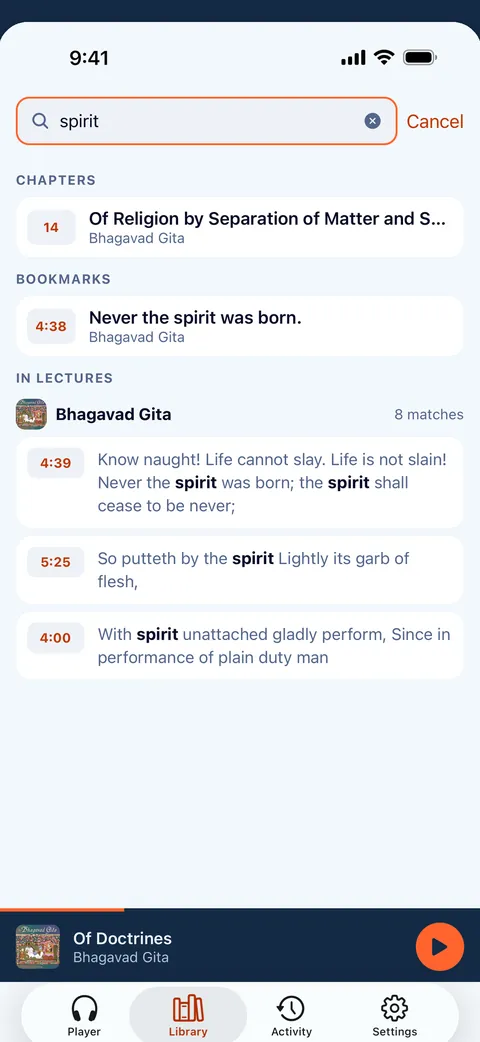
- Library search also finds the words spoken in books that have a transcript, and plays from that moment.
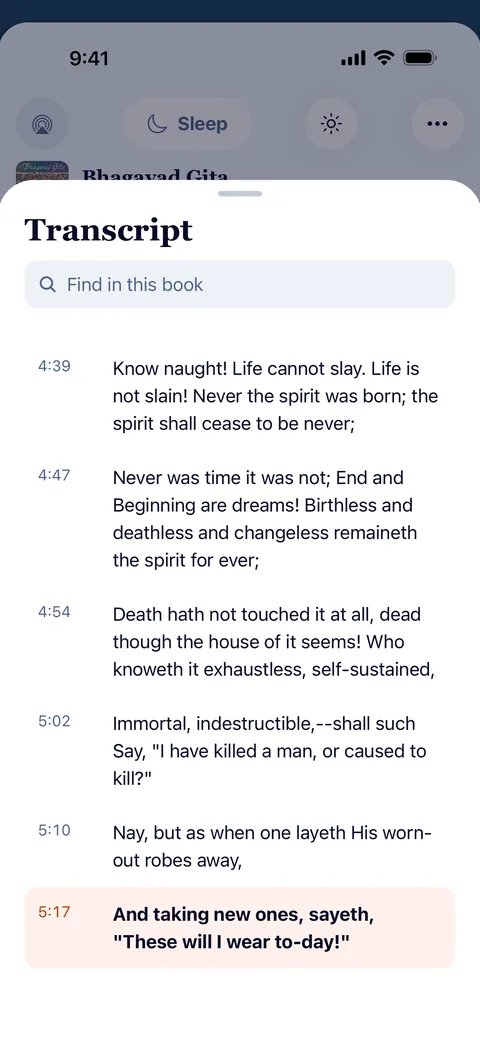
- Transcripts come from .vtt, .srt or .lrc files next to the audio. Help shows how to make them on your computer.
- Read along: the transcript follows playback; tap a line to jump there.
Arrange a course as a shelf
Use recordings you own or may use. Put each course in a folder and its lecture files inside; nested folders can be arranged as shelves in the library. Veda Audio Player treats a folder as a book and reads chapter details saved in the files. This makes a long course easier to browse without providing a course catalog.
Keep your place and notes
Each lecture keeps its own place and speed, so changing one recording does not reset another. Add a bookmark with a note when a lecturer makes a point you want to revisit. Return later and resume the lecture from its saved place. These tools suit classes, talks and lessons you already have as audio.
Search words from a transcript
With a prepared transcript beside an audio file, library search finds words and starts at that time. Veda Audio Player reads .vtt, .srt and .lrc; it does not make transcripts or recognise speech. The guide explains how to prepare a transcript on a computer. Read along and tap a line to jump. See the lecture search page and transcript guide.
Listen without a connection
Play files on your phone or tablet offline. Download server-hosted lectures before leaving the connection. Veda Audio Player plays your recordings; it does not provide them. Add only material you own or may use.
Questions
Does Veda Audio Player transcribe a lecture?
Other features
Veda Audio Player – Audiobooks
Your own M4B, MP3 & FLAC files