

Veda Audio Player
Your own server: Audiobookshelf, WebDAV, NAS
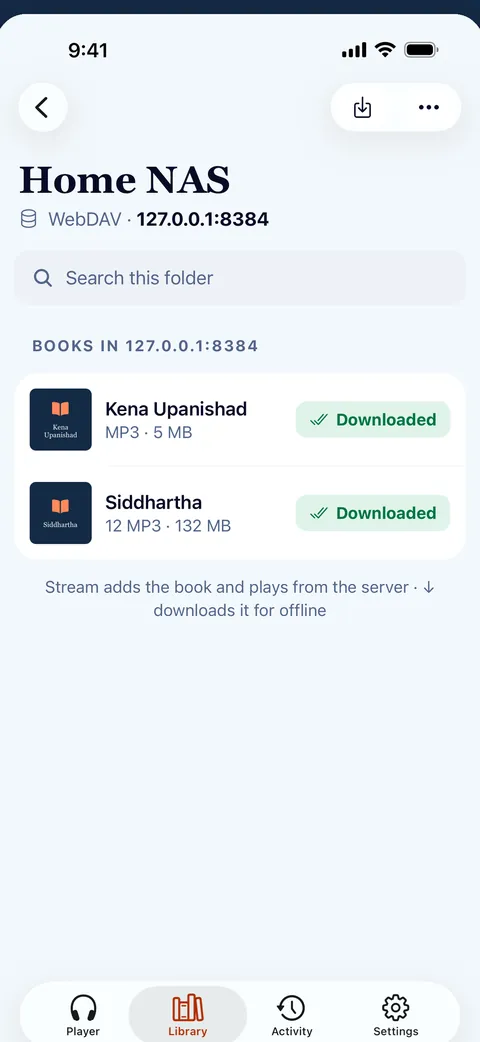
Keep the library at home and listen anywhere. Veda Audio Player connects to your server, then streams a book or downloads it to the phone.
FreeNo ads, no in-app purchases, no account and no tracking.
What it does
- Stream or download from your own server: WebDAV, a plain web folder or Audiobookshelf on your NAS or Nextcloud.
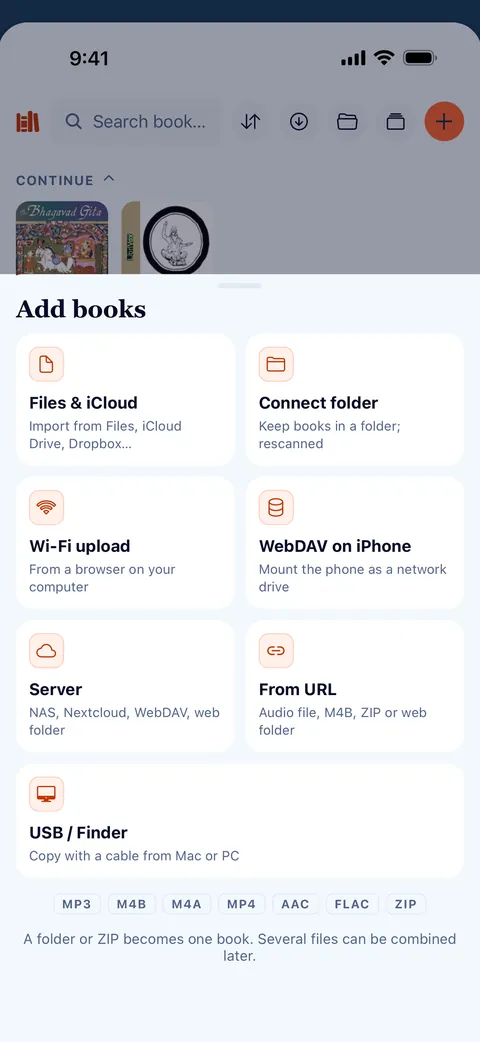
- Import from Files, the share sheet or a ZIP, or connect a folder and Veda Audio Player picks up new books by itself.
- Background downloads with pause, resume and Wi-Fi only.
- Streamed books keep the next files on the device, so they play on when the connection drops.
Questions
How do I add my books?
In the Library, tap + and choose a way in: Files (audio files or a ZIP), Connect folder (books stay where they are and new ones are picked up), your own server (WebDAV, a web folder or Audiobookshelf), Wi-Fi upload from a browser on your computer, a cable, or From URL (a link). Formats: MP3, M4B, M4A, MP4, AAC, FLAC, WAV and ZIP; on Android also OGG and Opus.
Other features
Search inside lectures
Remember a phrase but not which lecture?
Links
Paste a link, or share it from another app.
Formats
Play the audiobooks you already own, as they are.
Lecture player
Keep recorded lessons together in Veda Audio Player: arrange course folders as shelves, resume each lecture and leave a note at a useful moment.
LibriVox audiobooks
LibriVox volunteers record books in the public domain.
Veda Audio Player – Audiobooks
Your own M4B, MP3 & FLAC files
FreeNo ads, no in-app purchases, no account and no tracking.